Your logo, favicon & hero image
Upload your logo, favicon, and a hero image — they carry across your client portal and public booking pages.
Every facility runs a little differently — your services, your prices, your policies, your playbook. BarkWhiz bends to fit, from the logo on your client portal to the automations that quietly run your busywork. Here's how far the customization actually goes — nearly all of it live today, and we label the parts that aren't.
From the cosmetic to the bespoke.
Most kennel software makes you run your business its way. BarkWhiz goes the other direction — your branding, your catalog, your booking rules, your run setup, your playbooks, and your automations. Nearly everything on this page is live in the product today, and where a piece is still in development, we say so.
Your clients should see you, not us. BarkWhiz white-labels the parts they touch and the workspace your team lives in — the same booking page, wearing two facilities' brands:
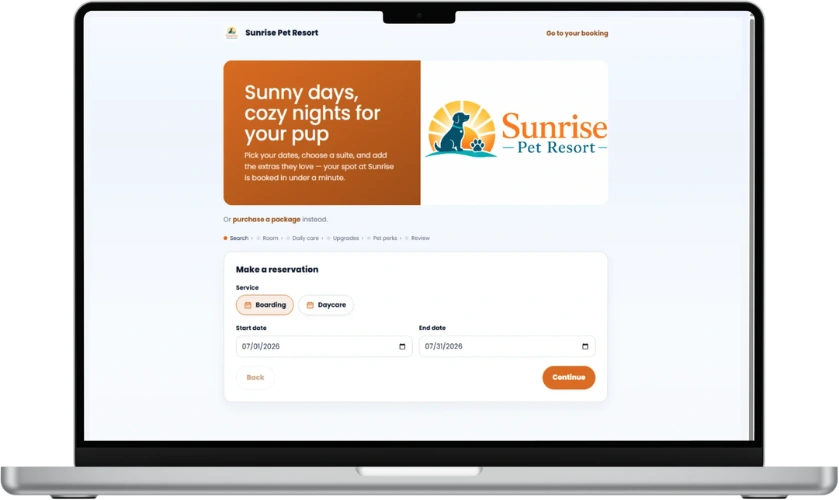
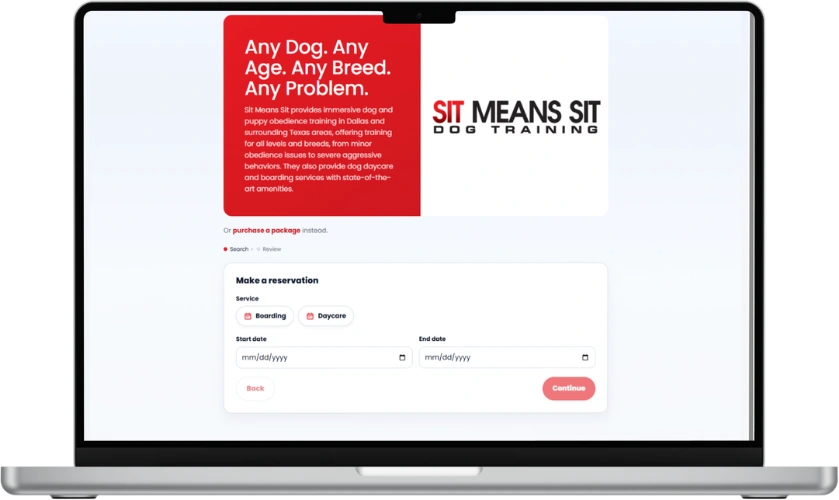
One product, two completely different looks — your logo, your color, your name. Your clients never see BarkWhiz.
Upload your logo, favicon, and a hero image — they carry across your client portal and public booking pages.
Set your accent color once and it themes the portal and the staff workspace — not a generic blue that's obviously somebody else's.
Your facility name headlines the portal and the workspace, so every screen reads as your business — useful when you run more than one location.
Set up your catalog and your policies the way your facility actually sells and schedules — no one-size-fits-all template forcing your hand.
Define your services with Basic-to-Premium tiers and the billing model that fits — flat, per day, per visit, or per unit — each at your price.
Bundle multi-visit packages, attach add-ons to the right services, and offer membership plans with their own entitlements and pricing.
Take bookings instantly or review-and-approve, require a deposit, set your daily capacity, and set appointment durations and buffers — your rules of the house.
And your building maps to reality: define your runs and kennels with sizes and service-tier rules, and the Kennel Whizard assigns dogs within them. Demand-based dynamic pricing is in development.
Decide what a new client actually does before they're a regular — the forms they sign, the meet-and-greet they pass, the program you run them through. You set the rules; BarkWhiz holds the line.
Write your own waivers, agreements, and intake forms, then require them for every client or only certain services. Clients sign online — from the portal or a one-tap email link — and the signed copy is stored on their record. More on forms & e-signatures →
Turn on a required meet-and-greet for new dogs before their first daycare or boarding stay. Your team records the outcome — approved, waived, or needs a follow-up — and a dog that isn't cleared can't be checked in by mistake.
Build a training curriculum from your own phases and skills, each with the success criteria you set, then enroll dogs and track their progress from introduced to mastered. See training programs →
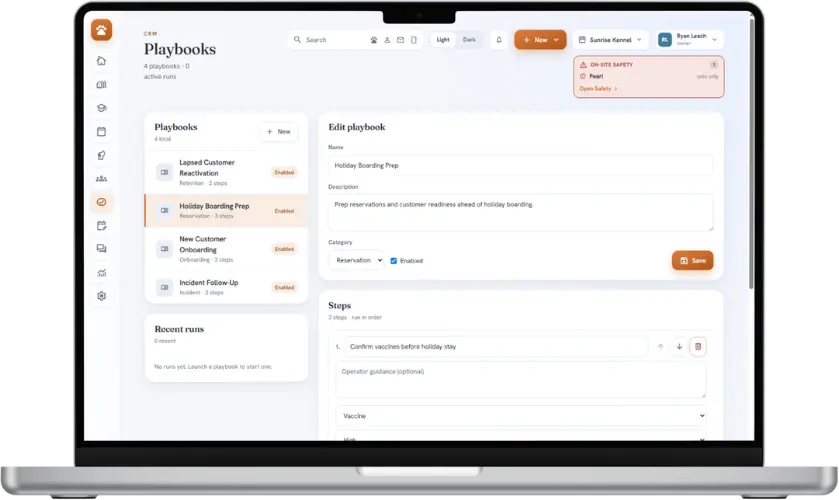
A playbook is your facility's repeatable routine, written down and made runnable — the holiday-boarding prep, the new-client onboarding, the lapsed-customer win-back. Build them once; run them on any customer.
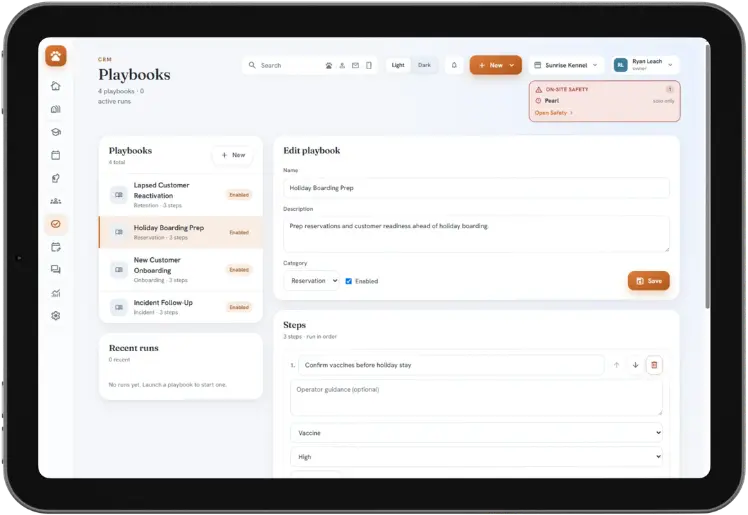
Create as many playbooks as you run — each with a name, a description, and a category like Onboarding, Retention, Reservation, or Incident.
Add steps in the order they should happen, each with a priority, a due time, and the role that owns it — front office, trainer, manager, kennel tech.
Launch a playbook against a customer and it spins up the whole task sequence — so the routine runs the same, every time, no matter who's on shift.
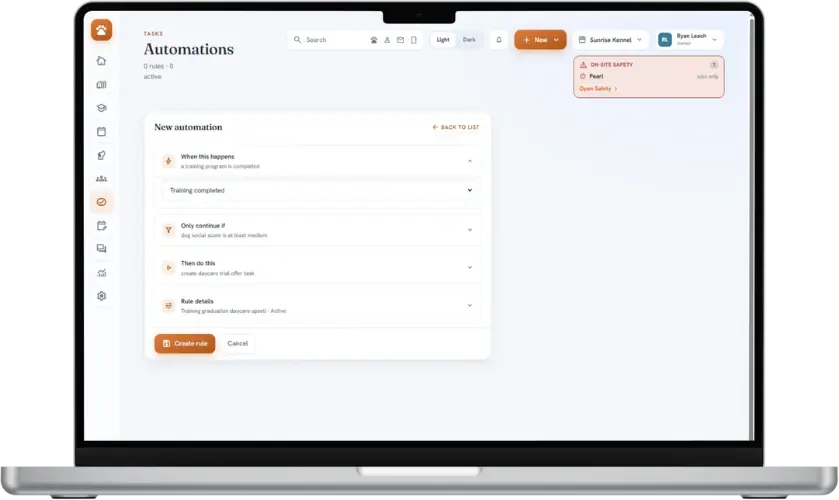
Build rules that watch for the things that happen on your floor and turn them into the right next move. When a stay ends, an incident is logged, a vaccine's about to expire, or a training program finishes — only if your conditions match — then BarkWhiz creates the task or launches a playbook.
It's the busywork that runs itself, without the part that should scare you: an automation queues up the next action for a human, it doesn't fire off messages to your clients on its own. You stay in the loop.
Triggers today: reservation completed · incident logged · feeding logged · customer gone quiet · vaccine expiring · training completed. Each rule fires one next action (create a task, or launch a playbook); richer multi-step rules are in development.
Give each person the right view with role-based access — owner, manager, front office, trainer, kennel tech — with real isolation across one location or several.
Bring your own stack: connect QuickBooks, take payments through Stripe, text from your own Twilio number, and capture leads with built-in forms — so BarkWhiz fits the tools you already run.
Straight talk on the edges
We'd rather be precise than oversell. Automations run one action per rule today (multi-step branching is in development), and demand-based dynamic pricing and the promotions engine are still being built. Everything else on this page — branding, catalog and pricing, booking policies, run setup, playbooks, single-action automations, and roles — is live and in real use with our first facilities. See the full feature set →
Founding facilities receive Ops + CRM for $249/month, locked for 24 months. After that, they retain a permanent 15% discount from the then-current list price.
We reply within two business days—or your first month is free. No credit card required.
Not ready for a founding spot? Just keep me posted