See it in action

See the work, from booking to a reviewed update.

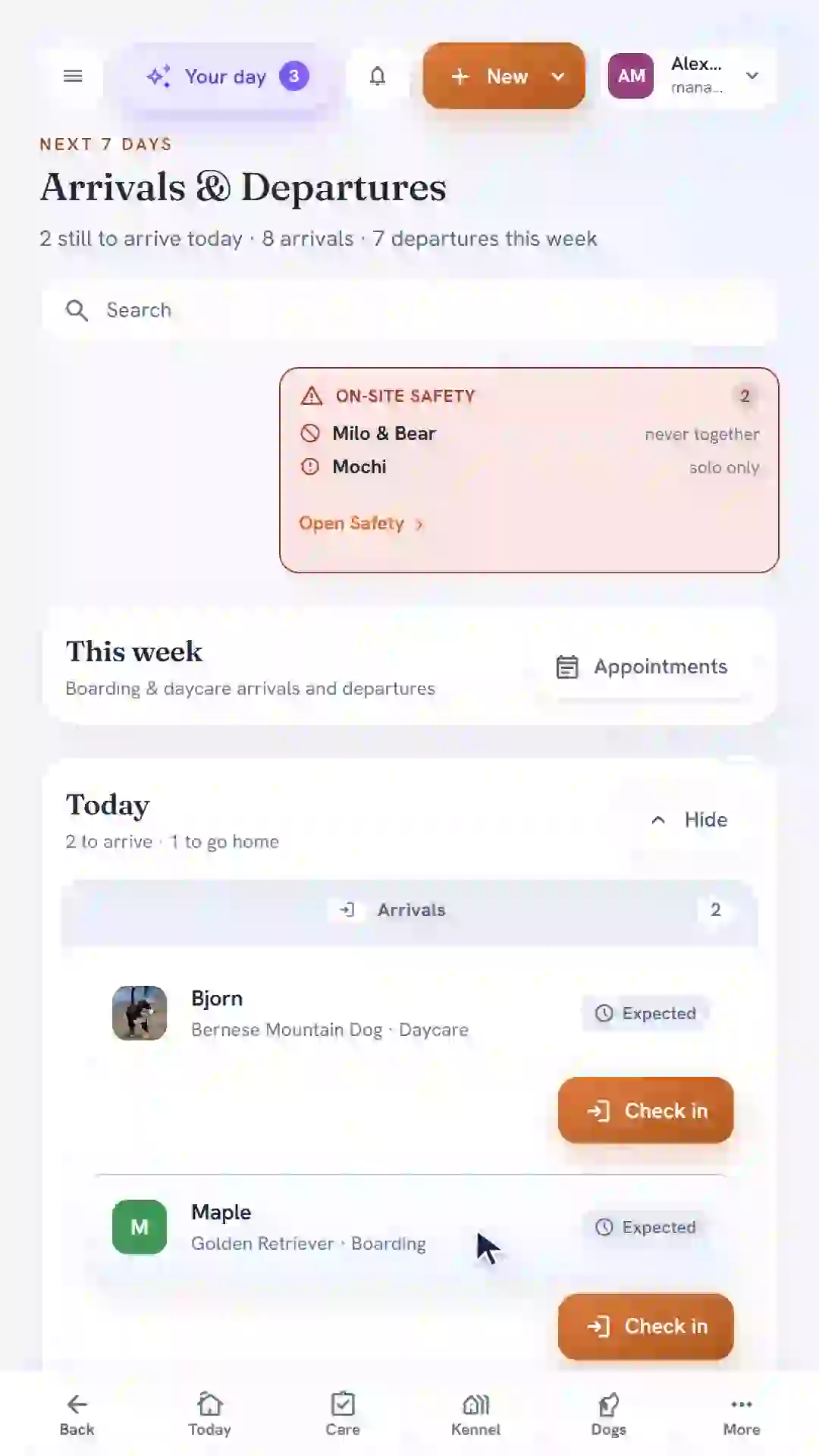
No "request a demo" form. No sales call first. These are real screens from BarkWhiz, recorded with demo data, showing the everyday jobs your front desk and floor staff do hundreds of times a week — with narration and captions to follow each step.

BarkWhiz reservation form with a demo boarding stay

Most kennel software hides its product behind a form.

See the actual interface running with demo data. Each recording names its starting point and shows the result. These are workflow demonstrations, not controlled speed or click-count benchmarks.

Four everyday jobs, with the starting point in view

Narrated demo · 29 seconds · English captions

Book a stay

Choose a dog, set the stay, and confirm the reservation.

Starting point: The New reservation drawer is already open. Jamie Parker and Maple already have profiles at Sunrise Kennel.

Choose the dog, boarding package, and dates; review the total and confirm Maple in today’s arrivals. No payment is collected.

Narrated demo · 22 seconds · English captions

Check in

Check in an expected arrival and assign an available run.

Starting point: Maple’s saved reservation is on today’s arrivals board. Check-in prerequisites are satisfied and Run 1 is available.

Check Maple in, choose the recommended run, and see the checked-in status beside the assignment.

Narrated demo · 24 seconds · English captions

Log care

Record a feeding and see the care board update.

Starting point: Maple is checked in and visible on the care board. The evening feeding is ready to record.

Record Maple’s evening meal as one cup offered, all eaten, with a normal appetite. Save and see the completed feeding on the care board. This example records an ad-hoc feeding.

Narrated demo · 43 seconds · English captions

Review an update

Generate a draft, review every detail, and save the edited update.

Starting point: The composer is open with Maple’s confirmed feeding facts already entered in the note. This example does not import the ad-hoc care log automatically.

Review the AI suggestions, remove unsupported descriptions, and keep the confirmed feeding facts. The clip ends with an edited draft saved; no message is sent.

What these recordings show

These recordings use synthetic demo data in the actual application. Each clip starts at the screen described beside it; existing profiles, reservation prerequisites, and prepared notes are called out. Only leading and trailing dead time is trimmed. No required action is hidden by an internal cut.

The care example records a detailed ad-hoc feeding. In the update example, its facts are entered into the note before recording, then used to draft text for human review. The operator removes unsupported suggestions and saves the edited draft. Delivery is not demonstrated.

These videos are not click-count or elapsed-time benchmarks. Your configuration and task affect the steps involved. The voiceover uses a synthetic narrator; captions and transcripts are available for every workflow.

Ask Ryan to walk through your own everyday workflow →

Beyond the task: the follow-up that comes next.

Speed is half the story. The other half is what happens after each job you just watched. Check a dog out and BarkWhiz doesn't just close the visit — it turns it into the next move your team should make.

That check-out you just did a rebooking nudge and a review request, drafted and waiting for a human to send.
A regular who hasn't been back a reactivation task surfaces, before you'd have noticed they slipped away.
A vaccine about to lapse a reminder before the next stay, not a scramble after.

These land as tasks and drafts for your team to review and send — never auto-sent. That's the reason to switch, not just the speed. How operations become follow-up →

Why it's this fast

Fewer clicks isn't a gimmick. It's the whole point.

Legacy kennel software was built to record transactions — so every job becomes a trail of screens, confirmations, and tab jumps. BarkWhiz is built around the work your team actually repeats all day, so the routine stuff gets out of the way.

Multiply a handful of saved clicks by every reservation, check-in, and care log in a week, and it stops being a detail. Estimate the hours your team could win back →

Want the side-by-side?

See how these same jobs stack up against the kennel software you're using now — credit where it's due, and where it slows your team down.

Make the switch

Ready to see your facility in it?

Founding facilities receive Ops + CRM for $249/month, locked for 24 months. After that, they retain a permanent 15% discount from the then-current list price.

Become a Founding Facility

Become one of our first 10 founding facilities

We onboard our first operators by hand — the same screens you just watched, set up around how your facility actually runs.

Not ready for a founding spot? Just keep me posted