Let them look before they commit
Dates and services first, paperwork second. A booking page should show a new client what's available and what it costs before asking who they are — the same order every hotel site figured out years ago.
Your clients book flights, dinners, and haircuts from their phone at 9 p.m. — and then hit your facility's "call during business hours." The fix isn't giving strangers direct write-access to your calendar. It's self-service done the operator's way: easy for them, approved by you.
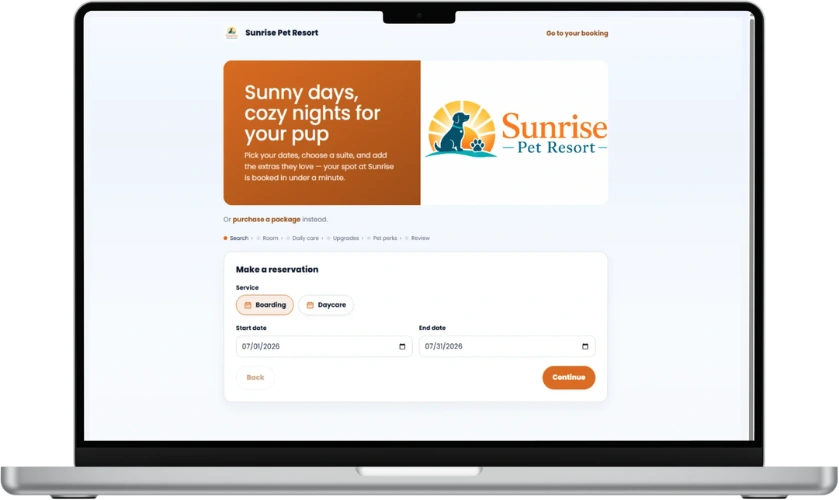
The most common way facilities lose an online booking: a new client clicks "Book now," hits a registration form demanding an account, a password, and every vaccine record before they can even see availability — and closes the tab. They wanted to check dates, not apply for a mortgage.
Dates and services first, paperwork second. A booking page should show a new client what's available and what it costs before asking who they are — the same order every hotel site figured out years ago.
Vaccine records, feeding notes, emergency contacts — you genuinely need them, but at confirmation, not at first click. Once the booking's requested, clients happily complete a profile; before it, every field is a reason to leave.
A booking page on your own link, with your logo and colors, keeps the trust you've built. Sending clients to a generic third-party portal wearing the software company's brand quietly spends it. (This is why BarkWhiz booking pages are white-label.)
The reason many operators resist online booking isn't laziness — it's that "instant booking" hands strangers write-access to a building full of dogs. A first-time client with an unvaccinated intact male shouldn't be able to book Christmas week unreviewed. The answer is request-and-approve: clients get the 9 p.m. convenience, and everything still lands in your queue before it hits the calendar.
The client picks dates, service, and add-ons and submits — done in a minute, any hour. Your front desk reviews it with the full picture (vaccines, temperament notes, the run map) and confirms. You're never surprised by what's on your board. In BarkWhiz this is a setting: instant or review-before-confirm — your call, per facility.
Reschedules and cancellations are where "self-service" most often goes wrong — a client silently moving a peak-week stay can wreck a full board. Handled as requests you approve, clients still get to ask from their phone at midnight, and you still decide what actually changes.
All of this — the no-login-wall booking page, request-and-approve, self-serve waitlists, deposits at booking, and the client portal — is live in BarkWhiz today, in early access with our first facilities.
BarkWhiz booking pages wear your brand, take requests around the clock, and route everything through your approval — self-service the way an operator would build it. Because one did.
Not ready for a founding spot? Just keep me posted